


PianoMeter – Piano Tuner
4.095.00 Reviews
App Specs
- Version
- 5.0.1
- Updated On
- License
- Free
- Downloads
- 100,000+
- Developer
- Willey Piano
- Categories
- Music & Audio
- Platform
- Android
Screenshots
 Analysis by AppCompare
When my piano sounds off, my first question is whether it needs a full tuning or just a quick check. PianoMeter – Piano Tuner is built for that hands-on job: it listens to piano strings and guides the tuning process rather than simply playing notes for you. I found that distinction important. This is not a casual music player or a substitute for learning piano; it is a specialist tool for someone willing to work carefully at the instrument.
My main impression is that the app aims to make a technical task approachable without pretending that tuning is effortless. It can help a pianist understand what is happening across the keyboard, but the phone is only one part of the process. You still need a piano, a quiet enough moment to listen, and the patience to handle the instrument thoughtfully. For a first-time tuner, that combination is more useful to keep in mind than any promise of instant results.
How quickly can you get to useful readings?
The initial setup felt straightforward in my experience, and the introductory guidance gives a new user a path into the task instead of leaving them to guess what to do next. Once the phone is positioned and the app is listening, the work becomes less about tapping through menus and more about producing clear notes and interpreting what the display is telling you. That makes the app feel quick to start, but it does not make a complete piano tuning a quick chore.
The speed you get depends on how prepared you are. Before opening the app, I would clear nearby distractions, make sure I can reach the relevant tuning hardware safely, and decide whether I am checking a small area or attempting a broader job. Moving methodically matters more than rushing from note to note. A useful reading is only the beginning; careful adjustment and rechecking are what make the result dependable.
Where the work gets demanding
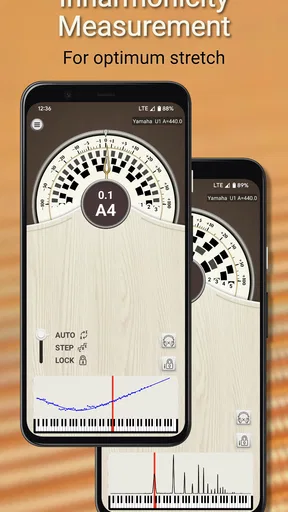
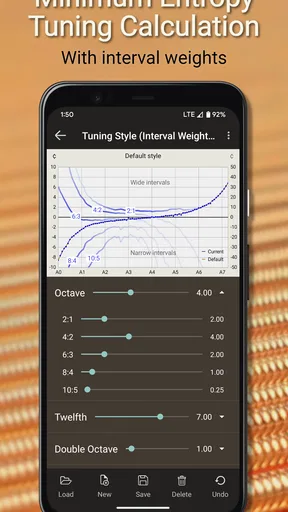
A piano has many strings and a wide range of notes, so a serious tuning session asks for steady attention. The app’s ability to account for a piano’s individual string behavior is relevant here: it is not simply imposing one ideal pitch without regard to the instrument. In my view, that makes it more appropriate for considered tuning work than a basic pitch reference, while also making the task feel less like a quick phone utility.
For a small check before playing, I would use the app to investigate a note or section that sounds suspicious rather than assume that every key needs adjustment. For a full session, I would plan breaks and keep track of where I have worked. That helps avoid losing concentration and making inconsistent adjustments. It is also a sensible way to learn: compare the sound and the readings as you go, rather than trying to change several things at once.
Reliability depends on the room and the phone
The phone’s microphone is central to this kind of tool, so placement and the surrounding sound can affect what it hears. A quiet room and a stable position are sensible starting points. If the reading seems unsettled, I would first stop other sounds, let the piano note ring clearly, and try again before deciding that the app itself is behaving badly. That small troubleshooting routine can save time and reduce the temptation to make an adjustment based on a confusing reading.
Worth Reading Before You Choose

Switching to Android Auto Means Rethinking Your Driving Routine

Google Calendar Makes a Crowded Week Easier to Manage

Baby Panda World Brings Quick Play to Modern Phones, but Its Game Library Feels Busy

ESPN’s Live Game View Makes Following Close Games Easier

QuizzLand Review: A Good Fit for Short Trivia Breaks, Not Every Player

Basketball Stars: Multiplayer Is Fast, but Can It Recover When Matches Go Wrong?
I also would not treat a phone reading as a reason to force a difficult adjustment. Piano tuning involves physical strings and hardware, and a user who is unsure how to handle them should stop rather than turn a small correction into a repair problem. In that situation, the app can still help you notice and describe an issue, while an experienced piano technician is the better choice for the actual work.
Getting Started with PianoMeter
So, I downloaded PianoMeter – Piano Tuner on a lazy Sunday afternoon, curious to see if it could really transform my out-of-tune piano into a melodious masterpiece. The download was quick, and installation was a breeze. Opening the app, I was greeted with a user-friendly interface that even my tech-challenged friends could navigate.
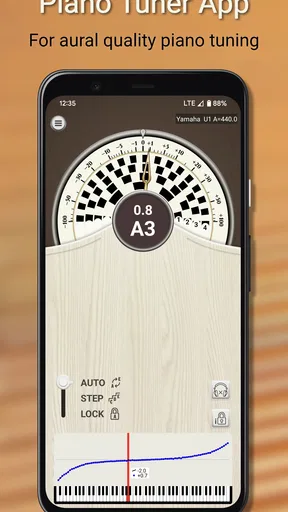
The app gives a quick tutorial on how to get started, which was super helpful. It walks you through the process of placing your smartphone on the piano and starting the tuning. Honestly, the setup was as easy as pie, and I was ready to dive into the world of piano tuning.
User Interface and Features
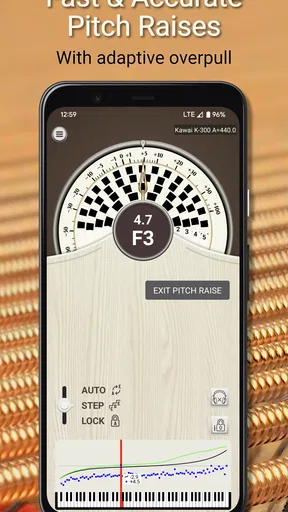
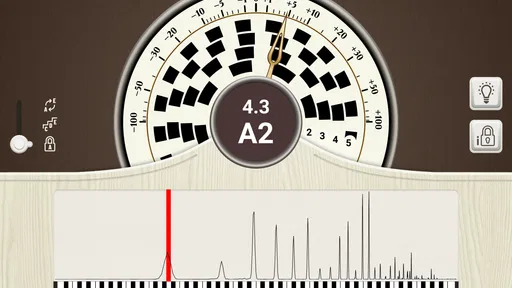
One of the first things I noticed was how sleek the interface is. It's clean, modern, and uncluttered, making it easy to focus on the task at hand. There's a satisfying mix of visual indicators and precise measurements, which made me feel like a pro (even though I was just winging it).
The app uses advanced technology to measure the inharmonicity of each string and calculate the optimal tuning. Now, I'm no expert, but I can appreciate the fact that it takes into account the unique characteristics of my piano. This feature made a noticeable difference in the sound quality.
- The app provides both a pitch detection mode and a tuning mode, which is great for those who are a bit more experienced and want to take a deeper dive.
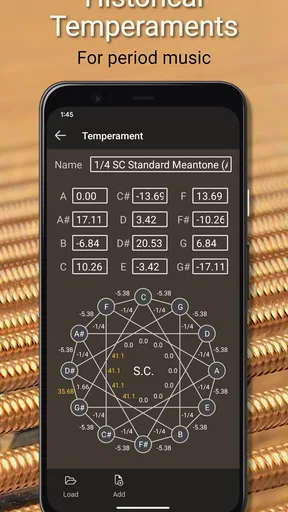
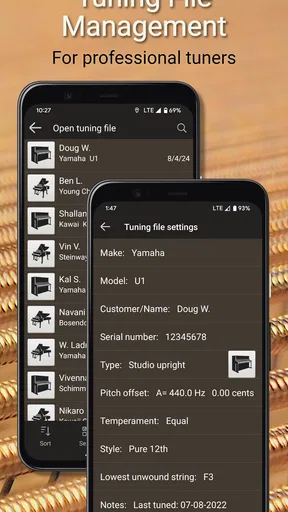
- There’s also an option to save your tuning preferences, which is a lifesaver if you have multiple pianos or if you want to keep track of your tuning history.
Performance and Accuracy
Now, let’s talk about performance. The app is impressively accurate. I was skeptical at first, wondering if a mere app could really tune my piano. But, surprisingly, it did a fantastic job. The app picked up on the subtle nuances of each string’s vibration and adjusted accordingly.
One thing to note is that your smartphone's microphone quality can affect the app’s performance. Fortunately, my phone did a decent job, and the results were as good as some of the professional tuners I've heard.
The Overall Experience
After spending some quality time with PianoMeter, I can confidently say it’s a game-changer for anyone looking to tune their piano at home. It’s not just for professionals; even beginners can get a lot out of it. The app is intuitive, effective, and doesn’t require any additional equipment, which is a huge plus.
One thing I’d love to see in the future is a community feature where users can share tips and tricks or even their tuning results. But for now, the app does a stellar job at what it promises.
In conclusion, if you’ve got a piano that's seen better days, PianoMeter – Piano Tuner might just be the perfect tool to bring it back to life. Give it a shot, and you might be surprised at how much of a difference it can make!
Who benefits most from this kind of tuner?
I would recommend this most readily to pianists who already know their way around the instrument and want a guided way to assess its tuning at home. A piano teacher, careful hobbyist, or technically curious owner may value being able to examine individual notes rather than relying only on a general impression that the instrument sounds dull. The pitch-detection mode also makes it useful for someone who wants to inspect a note without committing to a tuning adjustment straight away.
It is less suitable as a first encounter with piano maintenance for someone who expects the phone to do the physical work. The app can interpret sound and provide guidance; it cannot turn a tuning pin, judge the condition of a piano’s parts, or replace the judgement that comes from experience. If your goal is simply to hear a reference note, a basic tuner may be simpler. If the piano has a serious or longstanding problem, booking a technician is the more sensible route.
A practical routine for a home session
Imagine you sit down to practise and notice that a few notes in one part of the keyboard sound less settled than the rest. Rather than starting a large tuning project on the spot, I would first use the app in pitch-detection mode to check the area and listen for whether the same concern returns on repeated strikes. Then I would make a note of what seems inconsistent, take a short break if I am losing focus, and only proceed with adjustments if I understand the physical task.
This approach turns the app into a diagnostic aid as well as a tuner. It also guards against a common novice mistake: hearing one odd note and immediately assuming the entire instrument needs attention. A piano’s sound can be affected by the room and by how clearly a note is struck, so repeating a check under steady conditions is more useful than reacting to one reading. Saving preferences can also help when you return to the same instrument later, while separate records are useful if you look after more than one piano.
How it differs from simpler alternatives
Compared with a generic chromatic tuner or a tuning-note app, PianoMeter is aimed at the particular behavior of piano strings. Its inharmonicity-aware approach is the important distinction: the app considers characteristics of the instrument when working toward a tuning, instead of treating piano tuning as nothing more than matching each note to a standard pitch. That extra specificity is valuable for users who intend to do real piano work, but it also means a beginner should take time to understand the process.
A conventional tuner is often the better pick when portability and simplicity matter more than piano-specific guidance, or when you only need to check another instrument. A human tuner remains preferable when the piano needs broader care, when you are not comfortable making adjustments, or when the results remain confusing despite a quiet setup. I see the app as a practical middle ground: more purposeful than a generic pitch tool, but not a replacement for skilled hands or a full service visit.
Cost, compatibility, and sensible expectations
PianoMeter is free to install, with in-app purchases ranging from $9.99 to $349.99 per item, so I would check what is included for the task I have in mind before relying on it as a no-cost solution. The app is developed by Willey Piano, has a 4.0 average from 768 ratings, and has passed 100K+ installs. Those figures suggest an established niche audience, though they do not tell me whether the app will suit every phone or every piano.
It is rated for Everyone, was released on May 21, 2017, and its current version is 5.0.1, with Android 7.0 as the minimum operating system. That makes checking your device’s Android version a straightforward first step before installing. Because microphone quality matters, a phone that can capture a clear, steady sound is a better starting point than one whose microphone struggles in ordinary recording situations. I would also avoid judging stability in a noisy room: a confusing reading may reflect the sound environment rather than a crash or a failure to recover.
Where I would draw the line
The app’s strongest use is focused, patient work, not a rushed tune-up between other tasks. It asks you to combine what the phone detects with what you hear and what you can safely do at the piano. That is a worthwhile learning process, but it carries a real trade-off: if you are inexperienced, the very detail that makes a piano-specific tool useful can make the job feel demanding. I would start with observation and small, deliberate steps rather than treating a full keyboard as a weekend speed challenge.
For everyday practice, casual players may be happiest using the app to understand why a piano sounds uneven and then deciding whether to call a professional. For a dedicated owner who enjoys careful maintenance, it can make home checks more informed and give a repeatable way to approach the instrument. My performance verdict is positive, with a clear boundary: it is a focused, capable aid when the room is quiet, the phone is suitable, and the user is patient, but it is not a shortcut around piano-tuning skill.
Pros
- User-friendly interface for easy navigation.
- Highly accurate tuning capabilities.
- Supports a wide range of piano types.
- Offers detailed tuning instructions.
- Lightweight app with minimal storage use.
Cons
- Premium features require a subscription.
- Limited free version functionalities.
- Occasional lag on older devices.
- No offline tuning option available.
- Interface may feel basic to experts.
FAQs for PianoMeter – Piano Tuner
What is PianoMeter and how does it work?
PianoMeter is an innovative app designed to assist piano owners and technicians in tuning their instruments. It uses your device’s microphone to analyze the sound of each piano key, providing precise tuning guidance. The app helps you understand the current tuning state and guides you in making necessary adjustments.
Is PianoMeter suitable for beginners or only for professionals?
PianoMeter is designed to cater to both beginners and professionals. While experienced technicians can use its advanced features for precise tuning, beginners will find the user-friendly interface and step-by-step guidance helpful in learning the basics of piano tuning.
What devices and operating systems are compatible with PianoMeter?
PianoMeter is available for both Android and iOS devices. Ensure that your device meets the app’s minimum system requirements for optimal performance. It's essential to have a good quality microphone for accurate sound analysis, which most modern smartphones and tablets include.
Does PianoMeter require any additional equipment to function properly?
While PianoMeter can function with just your smartphone or tablet, having a high-quality external microphone can enhance accuracy. Additionally, if you plan on making physical adjustments to your piano, basic tuning tools like a tuning hammer and mutes are necessary.
Is there a cost associated with using PianoMeter, and are there any in-app purchases?
PianoMeter offers a free version with basic features. However, for more advanced functionalities, such as detailed tuning options and historical data tracking, you may need to purchase a premium version or subscribe to in-app purchases. Check the app store for current pricing and package details.


